Engineering article
Using Apple's container tool to build FoodieCalc's Vapor service locally
How Apple's new container tool helped me test a Swift Vapor microservice on my Mac without relying on Docker Desktop for local development.

FoodieCalc build notes
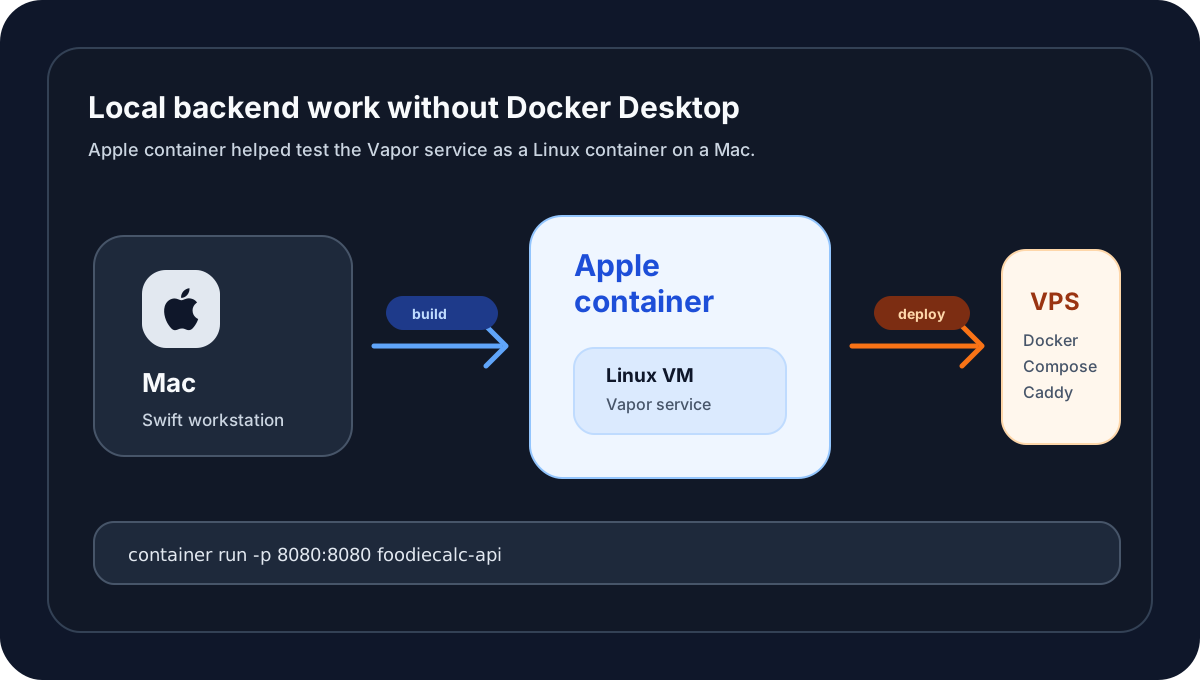
The FoodieCalc Vapor microservice was my first serious step from iOS app development into backend deployment.
The surprising part was not only Vapor. It was the local container workflow.
Instead of relying on Docker Desktop on my Mac, I used Apple’s new container tool to build and run the Vapor service locally. That gave me a Swift-native way to test a Linux container on Apple silicon before deploying the service to my VPS.
For an iOS developer, that felt like the right kind of bridge.
Why local containers mattered
The goal of the backend was clear: move FatSecret communication behind a Vapor microservice so FoodieCalc could stop shipping FatSecret secrets in the iOS client.
But once a service is going to run on a Linux VPS, “it works in Xcode” is not enough.
I needed confidence that the app could run in the same shape it would use in production:
- built from a Dockerfile,
- configured through environment variables,
- listening over HTTP inside a container,
- returning
/health, - serving
/foods/search, - and behaving the same way once the image moved to the server.
That is where containers became part of the learning path.
Why not just use Docker Desktop?
Docker is still part of the final deployment story. The VPS runs Docker Engine and Docker Compose, and Caddy sits in front of the Vapor container for HTTPS.
The local decision was more specific: I wanted to avoid depending on Docker Desktop on my Mac while I learned and tested the service.
Apple’s container project was a good fit for that local phase. The project describes itself as a tool for creating and running Linux containers as lightweight virtual machines on a Mac. It is written in Swift, optimized for Apple silicon, and works with OCI-compatible images.
That last part is important.
OCI compatibility means the image I test locally can still fit into the normal container ecosystem. I was not building something strange that only worked on my Mac.
The mental model clicked
Coming from iOS, I already think in terms of boundaries:
- views should not know about persistence details,
- ViewModels should not own networking implementation,
- feature modules should not reach into every other feature,
- secrets should not leak into places they do not belong.
Containers introduced a different boundary:
host Mac
  -> container runtime
  -> lightweight Linux VM
  -> Vapor app process
That made backend work easier to reason about. The service had to declare what it needed: ports, environment variables, and an executable entrypoint. If it needed hidden state from my Mac to work, that was a smell.
The local flow
The local loop became simple:
container system start
container build ...
container run -p 8080:8080 ...
Then I could test:
GET http://localhost:8080/health
GET http://localhost:8080/foods/search?search_expression=chicken
The local service used environment variables for APP_SHARED_KEY, FATSECRET_CLIENT_ID, and FATSECRET_CLIENT_SECRET, just like production.
That was an important discipline. The app source should not contain secrets, and neither should the container image. Secrets belong in the environment where the service runs.
What Apple container gave me
The biggest benefit was focus.
I did not need to learn a full local Docker Desktop setup before I could test the Vapor service. Apple’s tool gave me a narrow, understandable loop:
- build an OCI image,
- run a single service,
- bind a port,
- check the logs,
- stop the container,
- rebuild and try again.
That matched the shape of this project. FoodieCalc’s microservice is a single Vapor API, not a complicated local stack.
The production VPS is different. It uses Docker Compose because the server runs the Vapor container together with Caddy. Apple’s container tool does not replace that part of the plan, and that is fine. Locally I needed one container. On the server I needed orchestration.
The known tradeoff
Apple container is still young, and the plan treated that honestly.
There is no Docker Compose support in the local workflow, so it is not a full replacement for every Docker-based development setup. Cross-building images can also become slower if the Mac architecture and the server architecture differ.
For FoodieCalc, those limits were acceptable because the local target was simple:
one Vapor container over plain HTTPIf local image building becomes painful, GitHub Actions can build the production image instead. The important part is that the Dockerfile and image format stay standard.
How it helped the Vapor implementation
Using a container locally made bugs show up at the right boundary.
Instead of accidentally depending on a local Xcode run configuration, the service had to work like a deployable backend:
- read secrets from environment variables,
- expose the right port,
- return a health response,
- handle missing or wrong
X-App-Keyvalues, - call FatSecret only from the server,
- cache successful search results,
- and pass through FatSecret’s JSON response without changing the app’s decoding model.
That made the iOS integration cleaner too. The app did not need to care whether the backend was running locally, on the VPS, or rebuilt from CI. It only cared about the API contract.
What I learned as an iOS engineer
The biggest shift was learning to trust the boundary.
In iOS, I can see the app. I can tap the screen, watch SwiftUI update, inspect navigation, and feel whether the product is right.
With backend work, the feedback loop is quieter:
- logs,
- HTTP status codes,
- headers,
- environment variables,
- health checks,
- container lifecycle,
- and small integration tests.
It is less visual, but it is still product work. A better backend boundary gave FoodieCalc better security, cleaner networking code, and a path to scale food search with caching.
That made Apple container feel less like a shiny new tool and more like a learning bridge: from Swift on iOS to Swift on the server, from app screens to infrastructure, from local experiments to a VPS running a real service.
Where Docker still fits
This was not a “Docker is gone” story.
Docker still matters in deployment. The VPS uses Docker Engine, Docker Compose, and Caddy. Docker’s ecosystem is the practical server-side target.
The useful distinction is:
- Apple
containerfor local single-container development on my Mac. - Docker Engine and Compose for the VPS deployment.
- OCI images as the shared artifact between both worlds.
That is a nice architecture for this stage of FoodieCalc. It keeps local development light, while the production server stays conventional.